
How to Create Moving Headers with Mouse Position

In this article, I'll teach you how to create moving headers with mouse position (cursor position) like the one we have above.
Prerequisites
The Goal
I'll create a component, having an image as its background and it will move vertically (up and down), depending on the mouse position on it. The image will be centered if the mouse isn't on the header.
Step 1: Building the component
Let's go ahead and create a component, name it Header. The component will receive the image as a prop called backgroundUrl. We're going to need to know the exact height of the image. For that purpose, let's have a property called imageOriginalHeight and a method getImageDimensions, which will store the height into imageOriginalHeight:
Step 2: Building the main div
In the template section of our component, we're going to have a div with the image in the background, so let's assign it image-div class and set the height of the div to 225px:
Step 3: Defining the states
Basically, we're going to have two states: either the mouse is on the header and we do the animation or it's somewhere else and we just center the image. Let's add animate boolean in the data method and image-centered class so we can switch between the two states:
Step 4: Listening to the events
We're interested in three events: mouseenter, mousemove and mouseleave, so let's have three methods for them: startAnimation, performAnimation and endAnimation accordingly. When the mouse enters the area of the header, we start the animation by setting animate = true. When the mouse leaves the area, we end the animation by setting animate = false so the image is centered again. When the mouse is being moved, we're going to do the animation:
Step 5: Doing the math part
Let's understand how the whole animation works. Assuming the image has a larger height than the header itself, we have the following picture:
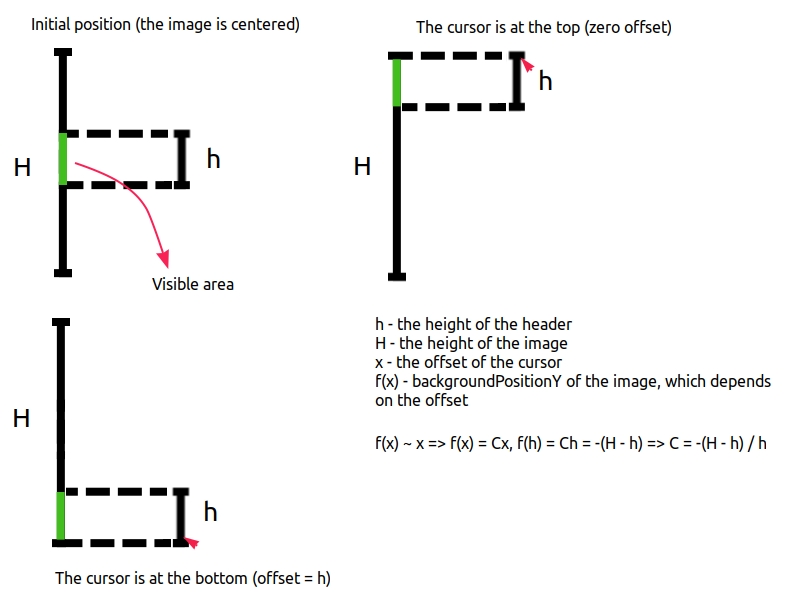
So when the cursor goes down, we'll pull the image up (by decreasing its backgroundPositionY) and vice versa. Since f(x) and x are directly proportional to each other, with some constant C we have f(x) = Cx. Let's find C. We have f(h) = Ch = -(H - h), so C = -(H - h) / h. Eventually, we got a formula: backgroundPositionY(x) = f(x) = -(H - h)x / h:
Summing it up altogether, we have the following:
Note: In case of horizontal movements, the solution is straightforward, you just need the exact width of the image and then to change backgroundPositionX depending on clientY.